
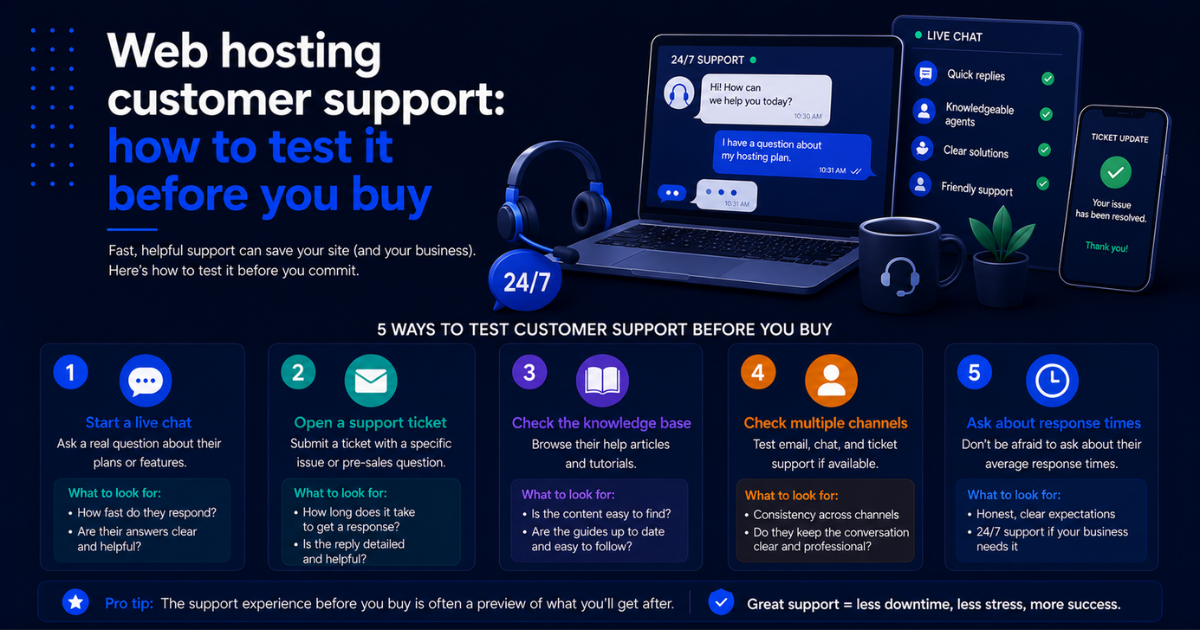
Web hosting customer support: how to test it before you buy
Affiliate Disclosure: This article contains affiliate links. If you purchase a hosting plan through one of our links, we may earn a commission at no extra cost to you. Our recommendations are based on independent research and real-world testing. We only recommend services we genuinely trust.
It is 9 p.m. on a Friday. Your site is down, your contact form has stopped working, and you have a product launch running paid ads that are sending traffic to a broken page. You open your host’s live chat and wait. And wait. Forty minutes later, a generic response arrives asking you to clear your cache.
Web hosting customer support is the most underrated factor in the hosting decision, and it is almost impossible to evaluate from a sales page. Every host claims 24/7 expert support. The reality varies wildly between providers. This guide gives you a concrete, repeatable framework for testing web hosting customer support before you commit, during the free trial or money-back guarantee window, so you know exactly what you are getting before you build anything important on their platform.
Before comparing types of web hosting and their infrastructure differences, make sure you understand what each tier actually delivers. Our complete guide to the different types of web hosting breaks down shared, VPS, cloud, and dedicated hosting so you can match the right tier to your needs. If you are still working through the broader hosting decision, our complete beginner’s guide on how to choose a web hosting service in 2026 covers every major evaluation factor. This page goes deep on web hosting customer support specifically.
From everything we have tested, [] SiteGround [] and [] Liquid Web [] consistently deliver the strongest web hosting customer support experiences across all channels and all hours.
[] Visit SiteGround – Test Their Support Risk-Free []
Why web hosting customer support is harder to evaluate than it looks
Most hosting review sites rate web hosting customer support based on a handful of test interactions run during a single week. That misses the variability that matters most: how a host performs at 2 a.m. on a Sunday, how they handle genuinely complex technical problems, and how their support quality holds up after you have been a customer for 18 months rather than 18 days.
Sales teams and front-line chat agents at hosting companies are often better resourced than the support teams that handle post-signup issues. It is a common pattern in subscription businesses: the experience of buying is polished, and the experience of needing help is inconsistent.
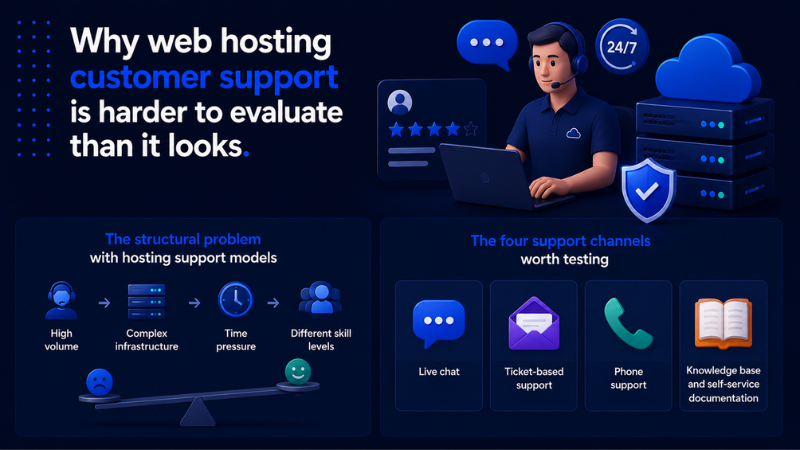
The structural problem with hosting support models
Many hosts outsource their web hosting customer support to third-party call centers or use tiered support models where the first responder has limited technical knowledge and escalation to someone with real server expertise takes hours. The agent you talk to during a pre-sales chat is often not the same tier of person you will reach when your database crashes at midnight.
Sales and pre-sales support tends to be faster and more polished than post-signup support at many providers. Testing web hosting customer support after you sign up, during the guarantee window, gives you the real picture rather than the sales experience.
The four support channels worth testing
Not all web hosting customer support channels are equal, and not all hosts offer all of them. Here is what each channel signals about a host and how to evaluate it properly.
Live chat
Live chat is the most commonly offered web hosting customer support channel and the most commonly misrepresented. Test it at off-peak hours, late evening or early morning, not during standard business hours when support teams are fully staffed. A host whose chat response time drops from two minutes during the day to 25 minutes at midnight has a staffing gap that will matter when you actually need them.
What to look for in a live chat interaction:
- Response time to initial contact at off-peak hours
- Whether the first response engages directly with your question or stalls with a canned greeting
- Technical depth of the answers on moderately complex questions
- How the agent handles a question they do not know the answer to
Ticket-based support
Ticket support is the standard fallback for issues that require longer investigation. A reasonable benchmark for web hosting customer support via ticket is first response within one to two hours for standard issues, with resolution or meaningful progress within four to eight hours for non-emergency issues.
When testing ticket support, submit a technical question that requires real investigation, not a simple password reset request, but something like a PHP configuration query or a question about server-level caching options.
Phone support
Phone support remains the gold standard for urgent, complex issues. When your site is down and you need someone to take immediate ownership of the problem, being able to talk to a technically capable person in real time is meaningfully different from waiting for a chat response.
Hosts that offer 24/7 phone support for all plan tiers include [] SiteGround [], [] Liquid Web [], InMotion Hosting, and A2 Hosting. Managed WordPress hosts like Kinsta and WP Engine do not offer phone support but compensate with highly responsive chat teams.
Knowledge base and self-service documentation
Even with the best live web hosting customer support team, you will resolve most small issues yourself. A well-maintained knowledge base means you can fix common problems without opening a ticket.
Evaluate a host’s knowledge base before you sign up. Search for a moderately technical topic such as increasing PHP memory limit or setting up SMTP email. If the articles are outdated or stop short of actual configuration steps, that is a signal about how much the host invests in self-service support.
A practical pre-signup testing protocol
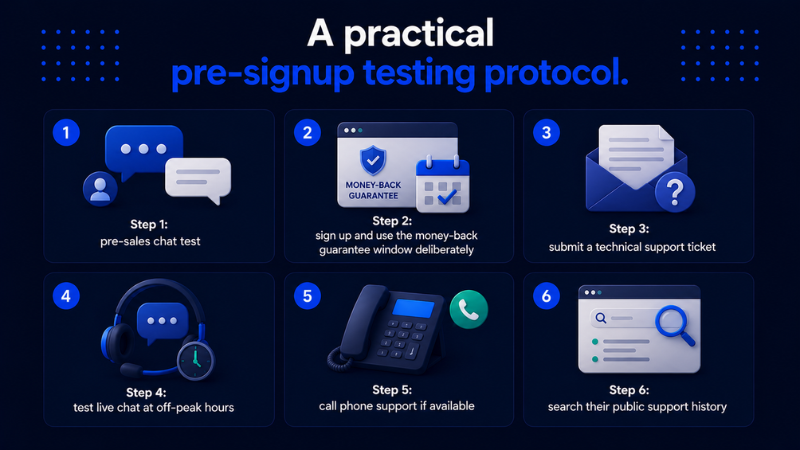
Here is the exact process I use when evaluating web hosting customer support quality before committing to a plan. It takes about two to three hours spread over a few days and gives you a meaningful picture of what the support experience actually looks like.
Step 1: pre-sales chat test
Before you sign up, open a live chat session and ask a technical question that a prospective customer might reasonably have. Something like: “I am planning to run WooCommerce with around 500 products and expect traffic spikes during promotions. Which of your plans would you recommend and why?”
What you are testing here is whether the agent gives you a genuine, specific answer or a generic upsell response. Good web hosting customer support engages with your specific situation before recommending a plan.
Step 2: sign up and use the money-back guarantee window deliberately
Most reputable hosts offer a 30-day money-back guarantee. Treat this as a paid evaluation period for web hosting customer support quality, not just a safety net. Sign up, set up a simple test site, and run your support tests with the urgency of a real customer.
Step 3: submit a technical support ticket
Within the first week of signing up, submit a genuine technical question through the ticket system. Log the following.
- Time from ticket submission to first response
- Whether the first response actually addresses your question or just acknowledges receipt
- Time to resolution or a substantive answer
- Technical accuracy of the response
Step 4: test live chat at off-peak hours
Run a second live chat test between 10 p.m. and 2 a.m. in your time zone. Ask a different technical question than you used in the pre-sales test. A host whose web hosting customer support quality drops significantly at off-peak hours is showing you their actual staffing model.
Step 5: call phone support if available
If the host offers phone support, call during a moderately busy period and note the hold time and the agent’s knowledge level. Then call again at an off-peak hour and compare. Consistency across time periods is the signal you are looking for in web hosting customer support.
Step 6: search their public support history
Before making a final decision, spend 15 minutes reviewing how the host has handled public incidents. Check their status page and look at how past incidents were communicated. Also check Web Hosting Talk, the most established hosting forum, and filter for recent threads about the provider. Look for patterns in complaints rather than isolated negative experiences.
Support quality comparison: what to expect from top providers
| Host | Live chat | Phone support | Ticket response | Knowledge base | Deal |
|---|---|---|---|---|---|
| SiteGround | 24/7, under 2 min | 24/7 all plans | Under 1 hour | Excellent | [] See Deal [] |
| Liquid Web | 24/7, under 2 min | 24/7 all plans | Under 1 hour | Excellent | [] See Deal [] |
| Kinsta | 24/7, under 2 min | Not available | Under 2 hours | Very good | [] See Deal [] |
| A2 Hosting | 24/7, under 3 min | 24/7 all plans | Under 2 hours | Good | [] See Deal [] |
Red flags that reliably predict poor web hosting customer support
Chatbot gatekeeping without clear escalation
If every live chat session starts with a bot and getting to a human requires multiple steps, that friction is by design. It reduces web hosting customer support volume by discouraging contact rather than by solving problems faster.
Agents who cannot answer server-level questions
Front-line support agents should handle common server configuration questions without immediately escalating. If every moderately technical question triggers an escalation, your real resolution time is always longer than the initial response time suggests.
Inconsistent answers across channels
If you ask the same technical question via live chat and via ticket and receive different answers, the web hosting customer support team lacks consistent documentation or training. That inconsistency compounds over time into a support experience you cannot rely on.
No public status page
Hosts that do not maintain a public status page are hiding their incident history. According to Atlassian’s research on incident communication, transparent incident communication is one of the strongest predictors of customer trust and retention. A host that goes dark during outages is one that will leave you uninformed during future problems.
Support that is excellent pre-signup and mediocre post-signup
This is the most common pattern in web hosting customer support and the hardest to detect without actually signing up. The pre-sales testing protocol above exists specifically to catch this by running genuine post-signup tests during the guarantee window.
What good web hosting customer support actually looks like
To calibrate your expectations, here is what strong web hosting customer support performance looks like in practice across the major channels.
| Channel | Good response time | Resolution benchmark | Quality signal |
|---|---|---|---|
| Live chat | Under 2 minutes any hour | Direct answer from first message | No canned responses |
| Ticket support | Under 1 hour | Progress within 4 hours | Accurate technical answers |
| Phone support | Under 5 min hold | No unnecessary transfers | Agent owns the issue |
| Knowledge base | Immediate | Step-by-step instructions | Updated within 12 months |
Good web hosting customer support does not exist in isolation from the rest of the hosting decision. A host with exceptional support but mediocre infrastructure is still a poor choice for a performance-sensitive site. A host with fast servers but unresponsive support is a liability for any business-critical application.
The framework in this guide is designed to give you real, comparable data on web hosting customer support quality before you commit, not just a gut feeling from a pre-sales interaction. Combined with independent uptime and speed data, realistic pricing analysis, and a clear sense of which hosting type fits your needs, support testing completes the picture.
For most business owners, [] SiteGround [] represents the best balance of web hosting customer support quality and value in 2026. Their 24/7 phone and chat support is staffed by technically capable agents at all hours, which is exactly what you need when something goes wrong at the worst possible moment.
[] Visit SiteGround – Test Their Support Risk-Free []
When you are ready to put all of those factors together and make a final decision about moving from your current host to a better one, our guide on how to switch web hosting providers without losing your site or your data walks through the full migration process step by step, including how to verify everything is working before you cancel your existing account.