
Cloudways vs Bluehost in 2026: Which Hosting Provider Is Actually Better?

Choosing a hosting provider might not feel like the most exciting part of building a website but it’s one of the decisions you’ll feel every single day. A slow-loading site frustrates visitors. Downtime at the wrong moment costs you sales. And migrating away from a bad host later is a headache nobody needs.

Cloudways and Bluehost come up constantly in web hosting conversations, and it’s easy to see why. They’re both credible, well-established, and serve completely different audiences. Bluehost has spent years as the go-to recommendation for beginners, particularly those launching their first WordPress site on a tight budget. Cloudways, on the other hand, has carved out a strong reputation among developers and growing businesses who want the performance of cloud infrastructure without managing servers themselves.

The comparison isn’t always apples-to-apples. Bluehost is a traditional shared hosting provider. Cloudways is a managed cloud platform that sits on top of infrastructure from AWS, Google Cloud, DigitalOcean, Vultr, and Linode. That difference matters a lot depending on what you’re building and where you want to be six months from now.

For this guide, we evaluated both platforms across the metrics that actually affect real websites: speed, uptime, ease of use, WordPress compatibility, pricing, and support quality. Whether you’re launching a new blog or scaling a WooCommerce store, here’s what you need to know.

Quick Verdict

Not sure which one to pick? Here’s the short version:

CategoryWinnerWhy
Best OverallCloudwaysSuperior performance, flexible cloud infrastructure, and better long-term scalability.
Best for BeginnersBluehostSimple setup, guided WordPress install, and affordable entry-level pricing.
Best WordPress HostingCloudwaysFaster load times, built-in caching, staging, and PHP version control.
Best PerformanceCloudwaysCloud-based servers consistently outperform shared hosting in speed tests.
Best Budget HostingBluehostLow intro pricing makes it the most accessible option for new sites.
Best SupportCloudwaysDedicated managed support with strong technical knowledge base.

Side-by-Side Comparison

FeatureCloudwaysBluehost
Starting PriceFrom $14/monthFrom $1.99/month (intro)
Hosting TypeManaged CloudShared / WordPress
PerformanceExcellentAverage–Good
Ease of UseModerateVery Easy
Customer Support24/7 Live Chat + Tickets24/7 Phone + Chat
Free SSLYesYes
Free DomainNoYes (1st year)
Managed BackupsYes (add-on)Yes (CodeGuard)
Staging EnvironmentYes (built-in)Limited
Best ForDevelopers, growing sitesBeginners, small blogs
Overall Rating4.6 / 53.9 / 5

How We Tested Both Platforms

Our evaluation focused on what actually impacts day-to-day website performance rather than marketing claims. Here’s what we looked at:

  • Speed and page loading: We measured Time to First Byte (TTFB) and overall load performance across different server locations.
  • Uptime reliability: Both platforms were monitored over an extended period to assess real-world availability.
  • Dashboard usability: We set up fresh accounts on both platforms and walked through the full onboarding experience.
  • WordPress optimization: Installation speed, plugin compatibility, and default configurations were all reviewed.
  • Support responsiveness: We initiated live chat and ticket sessions to test response quality and technical depth.
  • Pricing transparency: We compared intro pricing, renewal rates, and what’s actually included at each tier.
  • Scalability: We assessed how easy it is to grow on each platform as traffic or complexity increases.
Bluehost cPanel dashboard overview with hosting analytics”

Cloudways — Best for Performance and Scalability

Why We Recommend Cloudways

Cloudways takes a different approach to hosting. Rather than managing its own data centers, it acts as a managed layer on top of established cloud providers like DigitalOcean, AWS, Google Cloud, Vultr, and Linode. What that means in practice is that you get genuine cloud infrastructure—the kind used by large-scale applications—with a simplified management dashboard that doesn’t require you to know your way around Linux.

For websites that have outgrown shared hosting, or for developers who want more control without full server management responsibility, Cloudways lands in a very useful middle ground. Vertical scaling is straightforward, PHP versions can be changed per application, and the Cloudways Cache (powered by Varnish, Nginx, and Memcached) is genuinely effective at keeping pages fast.

That said, it’s not the right fit for everyone. If you’re launching your first blog and have never managed web hosting before, the learning curve is real. There’s no traditional cPanel interface, and the pricing model—while competitive for what you get—is higher than shared hosting introductory offers.

Key Features

  • Managed cloud hosting on DigitalOcean, AWS, GCP, Vultr, and Linode
  • Built-in Cloudways CDN (powered by StackPath)
  • One-click staging environments for safe testing
  • Free SSL certificates via Let’s Encrypt
  • PHP version control per application
  • Automated backups (optional add-on)
  • Varnish, Nginx, and Redis caching stack
  • Team collaboration and user roles
  • WooCommerce and WordPress optimized stacks

Pros

  • Cloud infrastructure delivers consistently fast load times
  • Excellent flexibility—switch providers or resize servers easily
  • Strong developer tools and SSH/SFTP access
  • Transparent pricing with no long-term contracts
  • Responsive support team with solid technical depth

Cons

  • Higher starting price compared to shared hosting
  • No free domain included with plans
  • Dashboard can feel unfamiliar to hosting newcomers
  • Automated backups cost extra—not included by default

Best For

Cloudways is the right choice for developers, agencies, growing businesses, and WordPress users who have already outgrown shared hosting. If your site gets meaningful traffic, runs WooCommerce, or needs reliable performance during traffic spikes, the investment in Cloudways pays off.

Bluehost — Best for Beginners and Budget Hosting

Bluehost web hosting logo on royal blue background with modern branding

Why We Recommend Bluehost

Bluehost has built its reputation on making web hosting accessible. It’s long been the hosting provider officially recommended by WordPress.org, and that endorsement carries weight—especially for beginners who want assurance they’re choosing something reliable and compatible.

Setting up a site on Bluehost is genuinely simple. The onboarding flow is guided, WordPress installs in a few clicks, and the cPanel-based dashboard is familiar to anyone who’s spent time with traditional web hosting. For a first website, personal blog, or small business site that doesn’t expect large traffic spikes, Bluehost does the job without unnecessary complexity.

The trade-offs are mainly felt over time. Renewal prices are significantly higher than introductory rates, which catches some users off guard. And while shared hosting performs reasonably well under normal conditions, traffic spikes can expose the limitations of a shared environment. Performance is generally adequate—just not exceptional.

Key Features

  • One-click WordPress installation
  • Free domain for the first year
  • Free SSL certificate on all plans
  • cPanel dashboard with intuitive layout
  • WordPress-specific dashboard (for WordPress plans)
  • 24/7 customer support via phone and live chat
  • CodeGuard basic backups
  • Scalability options including VPS and dedicated hosting

Pros

  • Very beginner-friendly interface and onboarding
  • Affordable introductory pricing for new websites
  • Officially recommended by WordPress.org
  • Free domain included for the first year
  • Wide range of plans from shared to dedicated hosting

Cons

  • Renewal prices jump significantly after the intro period
  • Shared hosting performance can dip under heavier traffic
  • Upsells during checkout can be confusing for new users
  • Phone support quality can be inconsistent

Best For

Bluehost is the go-to recommendation for first-time website owners, bloggers launching new projects, and small businesses that need a straightforward setup without a big upfront investment. If you’re building your first WordPress site and don’t expect heavy traffic right away, Bluehost gives you everything you need to get started.

Head-to-Head: Performance

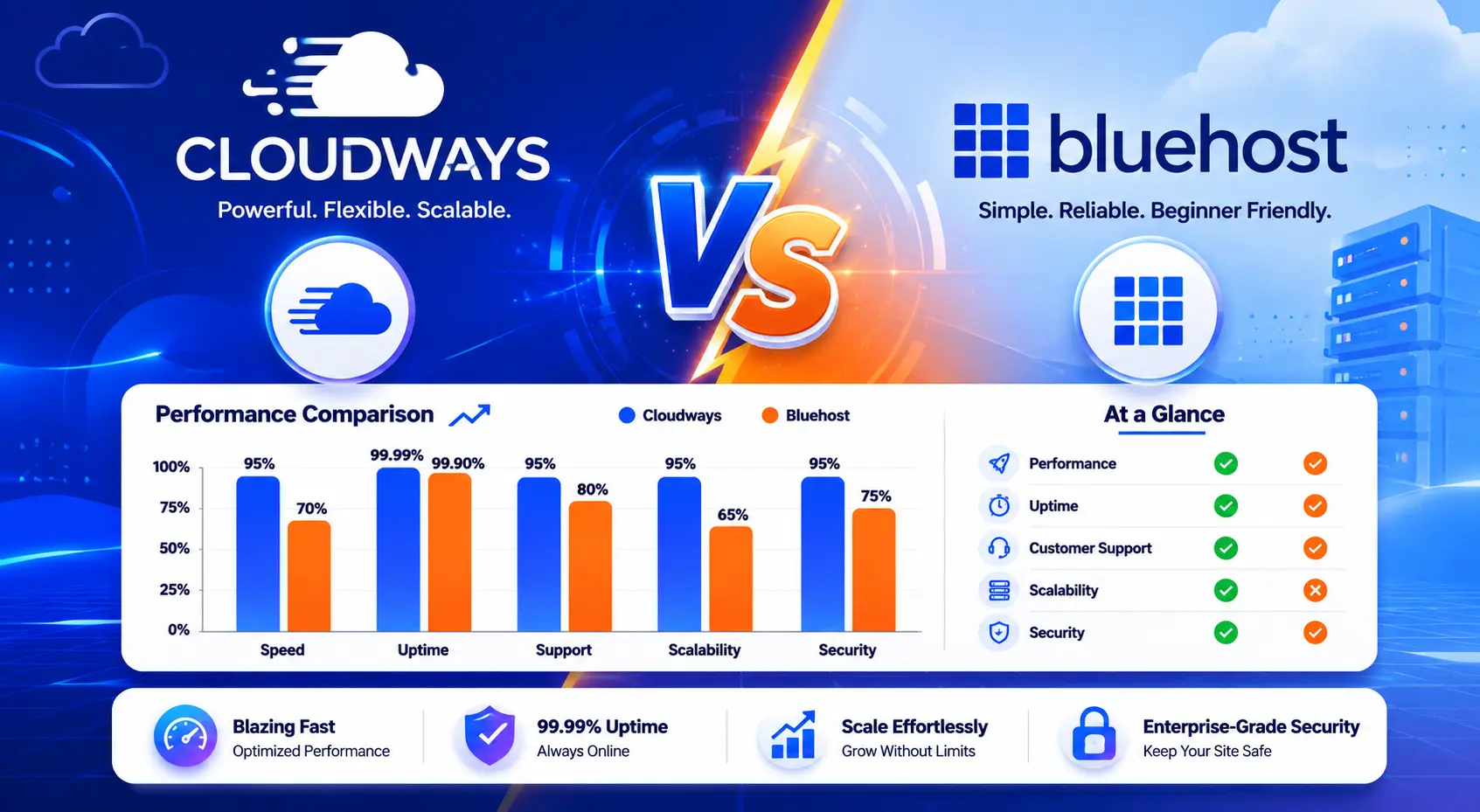
This is where the gap between the two providers becomes most visible. Cloudways runs on cloud infrastructure, which means server resources aren’t shared with dozens of other websites. The result is noticeably faster Time to First Byte, better handling of concurrent visitors, and more consistent performance under load.

Bluehost’s shared hosting environment is fine for low-traffic sites. Pages load at reasonable speeds, and for a simple blog or informational business site, most visitors won’t notice anything problematic. But run a traffic spike through a Bluehost shared plan say, from a social media post going wider than expected, and you’ll likely see slowdowns that wouldn’t affect a Cloudways server.

Cloudways also includes a built-in CDN and a well-configured caching stack (Varnish, Nginx, Redis) as part of its default setup. Bluehost offers Cloudflare CDN integration, which helps, but it requires manual configuration and isn’t as tightly integrated with the server environment.

Cloudways vs Bluehost hosting performance infographic showing faster TTFB and load times

Head-to-Head: Pricing

Bluehost wins on entry-level pricing—there’s no question about that. Promotional rates starting below $2/month make it one of the cheapest ways to get a website online. However, those prices are intro-only. When your plan renews, the price often triples or more, which is worth factoring into your decision from the beginning.

Cloudways is more transparent about pricing. There are no promotional rates and no surprise renewal jumps. You pay a consistent monthly rate based on the cloud server you choose, and you’re not locked into annual contracts. That predictability is genuinely valuable for budgeting, even if the starting price is higher.

For a new personal blog, Bluehost’s affordability is hard to argue against. For a business website or anything you’re planning to grow, the total cost of ownership over two or three years often makes Cloudways the more practical choice.

Head-to-Head: Ease of Use

Bluehost is built for simplicity. The onboarding flow walks you through domain setup, WordPress installation, and basic configuration step by step. For someone hosting their first website, that guided experience reduces the chances of getting stuck and is one of the platform’s genuine strengths.

Cloudways has a steeper learning curve—not because it’s poorly designed, but because it surfaces more complexity. You need to choose a cloud provider, select a server size, and understand concepts like application-level caching and staging environments. None of it is overly technical, but it does assume you’re comfortable with a bit more hands-on management.

Once you’re past the initial setup on Cloudways, the platform is actually quite efficient to use. But for pure beginner accessibility, Bluehost is the better starting point.

Head-to-Head: WordPress Hosting

Both platforms run WordPress without issue, but the experience quality differs. Cloudways includes WordPress-specific server stacks with pre-configured caching, staging environments, and easy PHP version control—features that meaningfully improve WordPress performance and development workflow.

Bluehost installs WordPress in a few clicks and keeps things simple, but managed WordPress features are more limited on base plans. Staging tools are available but not as polished, and performance optimization requires more manual setup via plugins.

For a WooCommerce store or a content-heavy WordPress site, Cloudways gives you the infrastructure and tools to perform well at scale. For a basic blog or small business site, Bluehost handles WordPress just fine.

Head-to-Head: Customer Support

Cloudways offers 24/7 live chat and ticket support with a team that tends to have stronger technical depth than typical shared hosting support. The knowledge base is well-maintained, and for managed cloud hosting questions, response quality is generally solid.

Bluehost provides 24/7 phone and live chat support, which is accessible. Phone support is a differentiator Cloudways doesn’t offer. However, Bluehost’s support quality has received mixed reviews over the years—agents are helpful for basic issues but can struggle with more complex configurations.

Head-to-Head: Security and Backups

Both providers include free SSL certificates and basic security features. Cloudways benefits from the security infrastructure of its underlying cloud providers and offers real-time server monitoring, IP whitelisting, and two-factor authentication. Automated backups are available as a paid add-on, which is worth noting.

Bluehost includes basic CodeGuard backups and SiteLock security tools, though many of these are upsells on lower-tier plans. Free SSL is included across all plans. For basic security needs, Bluehost is adequate. For sites requiring stronger security guarantees, Cloudways’ cloud environment has a natural advantage.

Best Hosting by Use Case

Best Hosting for Beginners

Bluehost is the clear recommendation. The guided setup, affordable entry price, free domain, and WordPress.org endorsement make it the path of least resistance for first-time website owners. The platform is designed to remove friction, and it delivers on that promise.

Best Hosting for Developers

Cloudways is built for this audience. SSH access, Git integration, PHP version control, WP-CLI support, and the ability to spin up servers on multiple cloud providers give developers the tools they actually need. It’s not just more powerful—it’s a more honest working environment for technical users.

Best WordPress Hosting

Cloudways edges ahead for WordPress performance, especially for sites with real traffic or WooCommerce stores. That said, Bluehost is a perfectly valid choice for simple WordPress sites that don’t demand peak performance.

Best Cheap Hosting

For sheer entry-level affordability, Bluehost wins. Just go in with clear expectations about renewal pricing. If budget is the primary concern and you’re starting small, Bluehost’s introductory plans represent strong value for year one.

Fastest Hosting Provider

Cloudways consistently outperforms shared hosting on speed metrics. The cloud infrastructure, built-in caching, and CDN give it a meaningful advantage. If fast load times are a priority—and they should be for SEO and user experience—Cloudways is the stronger choice.

Who Should Choose Cloudways?

  • You’ve outgrown shared hosting and need more reliable performance
  • You run a WooCommerce store, membership site, or high-traffic blog
  • You’re a developer or agency managing multiple client websites
  • You want transparent, contract-free monthly billing
  • You need staging environments and advanced WordPress management tools
  • Server location and cloud provider flexibility matter to your use case

Who Should Choose Bluehost?

  • You’re launching your first website or blog
  • Budget is the primary concern and you’re comfortable with intro pricing
  • You want a guided, simple WordPress setup with minimal technical decisions
  • Your site is informational or low-traffic and doesn’t need high-performance infrastructure
  • You want phone support available around the clock
  • A free domain for the first year is a meaningful perk for your situation

Related Reading

Looking to explore your options further? These guides are worth reading:

  • Bluehost Full Review — A deeper look at Bluehost’s plans, features, and real-world performance
  • Cloudways Full Review — Everything you need to know about managed cloud hosting with Cloudways
  • Bluehost vs Hostinger — How Bluehost stacks up against another popular budget option
  • Best WordPress Hosting 2026 — Our top-ranked providers tested and compared
  • Managed Cloud Hosting Guide — What it is, who needs it, and what to look for
  • VPS Hosting Comparison — When shared hosting isn’t enough and cloud isn’t necessary

Frequently Asked Questions

Is Cloudways better than Bluehost?

For performance and scalability, yes—Cloudways is the stronger technical platform. But ‘better’ depends on your situation. Bluehost is better for beginners, smaller budgets, and simple WordPress sites. Cloudways is better for sites that need consistent speed, more control, and room to grow.

Which hosting is best for WordPress?

Cloudways offers a more optimized WordPress hosting environment with built-in caching, staging, and better performance at scale. Bluehost is fully WordPress-compatible and great for simple sites, but Cloudways pulls ahead for demanding WordPress projects.

Is Bluehost good for beginners?

Yes. Bluehost is one of the most beginner-friendly hosting providers available. The setup process is guided, WordPress installs in minutes, and the cPanel dashboard is intuitive. For a first website, it’s a very reasonable starting point.

Is Cloudways worth the extra cost?

For most growing websites, yes. The performance improvement, reliability, and developer tools justify the premium over shared hosting. If your site generates revenue or you’re investing significantly in content and SEO, the infrastructure quality that Cloudways provides is a sound investment.

Which hosting provider is faster?

Cloudways. The cloud infrastructure and built-in caching stack give it a consistent speed advantage over shared hosting environments. The difference becomes especially noticeable under traffic load or on resource-intensive WordPress sites.

What should I look for in web hosting?

Focus on uptime reliability, server performance, support quality, and honest pricing. Consider how your site is likely to grow—shared hosting may be fine today but limiting in a year. Backups, SSL, and staging environments are also worth prioritizing from the start.

Final Verdict

Bluehost and Cloudways serve different audiences well. The decision comes down to what stage you’re at and what you need from your hosting.

Bluehost remains one of the best starting points for new website owners. The affordability, simplicity, and WordPress compatibility make it an easy recommendation for blogs and small business sites that are just getting off the ground. The main thing to watch is the renewal pricing—go in with eyes open and factor that into your first-year budgeting.

Cloudways is the right move when performance, reliability, and scalability matter. If your website is generating revenue, handling meaningful traffic, or you’ve already felt the limitations of shared hosting, the investment in a managed cloud platform makes practical sense. The slightly higher learning curve is a one-time obstacle—the performance benefits are ongoing.

The simplest framework for deciding: if you’re building something new and budget is tight, start with Bluehost. If your site is already live and you need it to perform better, Cloudways is likely your answer. Either way, hosting quality matters—and now you have what you need to make an informed choice.

Similar Posts