
How to choose a web hosting service: Best 2026 guide
Affiliate Disclosure: This article contains affiliate links. If you purchase a hosting plan through one of our links, we may earn a commission at no extra cost to you. Our recommendations are based on independent research and real-world testing. We only recommend services we genuinely trust.Affiliate Disclosure: This article contains affiliate links. If you purchase a hosting plan through one of our links, we may earn a commission at no extra cost to you. Our recommendations are based on independent research and real-world testing. We only recommend services we genuinely trust.
Knowing how to choose a web hosting service is the first step every site owner needs to take before spending a single dollar. Picking the wrong plan means either paying for resources you do not need or running a site that cannot handle its own traffic. This complete beginner’s guide covers every major factor that goes into choosing a web hosting service in 2026, from hosting types and real pricing to uptime benchmarks and support quality, so you can make the right decision with confidence.
This guide cuts through that noise. It covers every major factor that goes into choosing a web hosting service in 2026, the hosting types, performance benchmarks, real pricing structures, business-specific requirements, support quality, and what happens when you eventually need to move to a better provider. Whether you are launching your first site or evaluating a switch from a host that has been letting you down, the goal here is to give you a clear, honest framework for making that decision with confidence.
We run a web hosting blog that tests, reviews, and compares hosting providers. The recommendations and frameworks in this guide come from hands-on experience with real hosting environments, not from reading sales pages.
For readers who want a starting point before going deeper into each section, [] Hostinger [] is the host we recommend most often to first-time buyers who need a reliable, affordable entry point with transparent pricing and no surprise renewal rates.
[] Visit Hostinger – Best Entry-Level Hosting in 2026 []
How to choose a web hosting service: start with the right hosting type
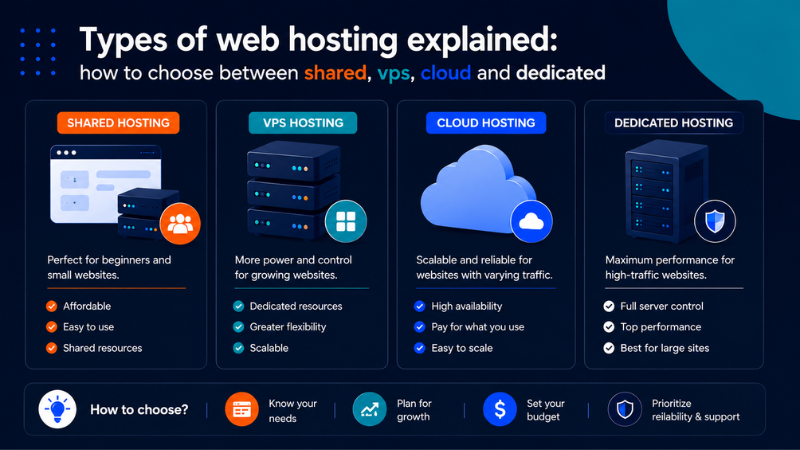
The first step in how to choose a web hosting service that fits your needs is understanding the difference between shared, VPS, cloud, and dedicated hosting.
Understanding how to choose a web hosting service starts with knowing which hosting type matches your current traffic, budget, and technical comfort level.
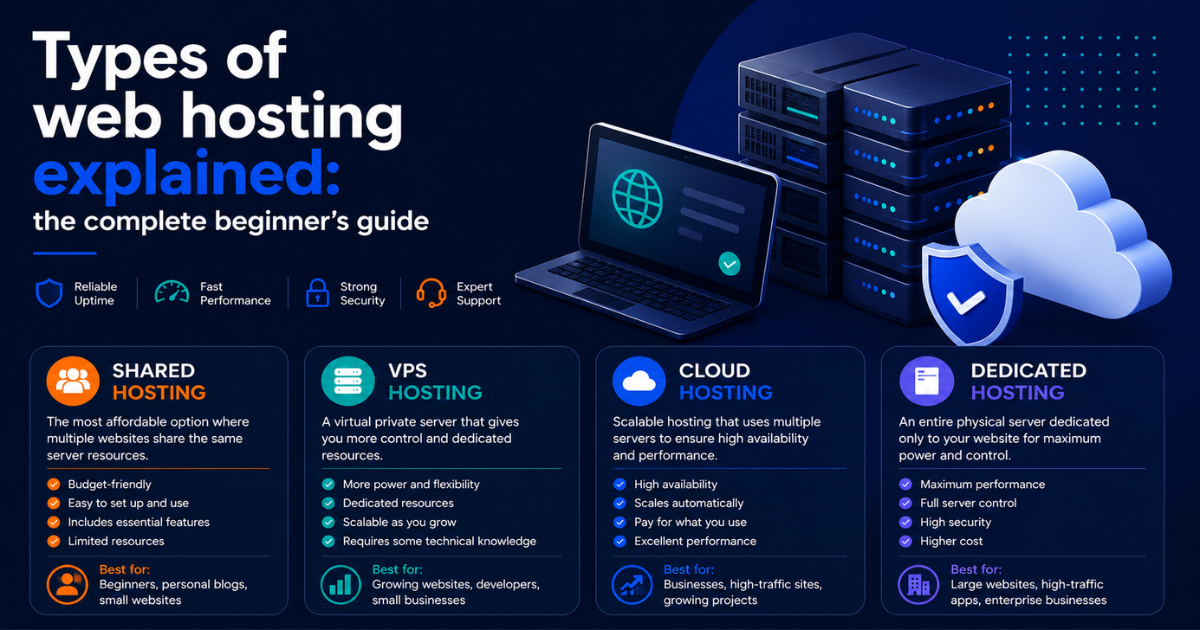
There are four main hosting types in active use today: shared, VPS, cloud, and dedicated. Each one represents a different relationship between your website and the underlying server hardware.
Shared hosting
On a shared server, your website coexists with dozens or sometimes hundreds of other websites. You all draw from the same pool of CPU, RAM, and bandwidth. This is the most affordable option and the right starting point for most new websites.
Shared hosting works well for personal blogs, informational business sites, and portfolios that receive fewer than 10,000 monthly visitors. Pricing runs between $2 and $10 per month at promotional rates. The limitation is the noisy neighbor effect: if another site on your server experiences a traffic surge, your performance can take a hit.
VPS hosting
A Virtual Private Server gives you a dedicated slice of a physical machine. Your allocated CPU and RAM are yours regardless of what other users on the same hardware are doing. This is the right move when shared hosting starts showing its limits: slow load times under moderate traffic, resource cap warnings, or a need for custom server configuration.
Managed VPS plans run $30 to $80 per month and include server maintenance from the host. Unmanaged plans are cheaper but require you to handle software updates and security patches yourself.
Cloud hosting
Cloud hosting distributes your site across a network of servers rather than a single machine. The practical benefit is scalability: if your traffic doubles overnight, the cloud environment adjusts without you doing anything. Redundancy is also built in, meaning a single server failure does not take your site offline.
This is the right tier for sites with unpredictable or seasonal traffic, high-traffic media properties, and eCommerce operations where downtime directly costs money.
Dedicated hosting
A dedicated server means one physical machine, entirely yours. No shared resources, full configuration control, and maximum performance. This tier makes sense for enterprise-level sites, applications with strict compliance requirements, and operations handling millions of monthly page views. Pricing starts around $80 per month and can exceed $300 for high-spec configurations.
Hosting types at a glance
| Hosting type | Best for | Avg. monthly cost | Technical skill needed |
|---|---|---|---|
| Shared | Beginners, small blogs, informational sites | $2 to $10 | Low |
| VPS | Growing sites, developers, eCommerce | $20 to $80 | Medium |
| Cloud | High traffic, variable load, media sites | $10 to $150+ | Medium to high |
| Dedicated | Enterprise, compliance, high-volume apps | $80 to $300+ | High |
If you want a deeper breakdown of each hosting type with technical detail and real-world analogies, ourcomplete guide to understanding shared, VPS, cloud, and dedicated hosting covers every tier from the ground up.
What uptime and speed benchmarks actually tell you about a host
When you choose a web hosting service based on uptime claims alone, you risk being misled by numbers that look better than they are in practice.
Once you have identified the right hosting type, the next factor to evaluate is performance. Two metrics dominate this conversation: uptime and page load speed. Both appear on every hosting sales page. Neither one means exactly what the marketing copy suggests.
Understanding uptime guarantees
A 99.9% uptime guarantee sounds close to perfect. In practice, it allows up to 43.8 minutes of downtime per month and roughly 8.76 hours per year. For a personal blog, that is acceptable. For a business running paid advertising campaigns, those are hours of wasted ad spend and lost conversions.
The measurement problem makes this more complicated. Many hosts calculate uptime at the server level, meaning they track whether the server is running, not whether your specific website is actually accessible and loading correctly. A server can be technically up while your site returns errors or times out on database queries.
Always look for uptime data from independent monitoring services rather than self-reported numbers from the host.
Page speed and Time to First Byte
Page load speed affects both user experience and search rankings. Google’s Core Web Vitals measure specific performance thresholds, with Largest Contentful Paint being the most directly influenced by hosting quality. Google’s target is LCP under 2.5 seconds.
Time to First Byte is the most reliable hosting-specific speed metric. It measures how long a server takes to respond to a browser request before any content loads. A good TTFB on shared hosting is under 600 milliseconds. On a VPS or cloud environment, under 200 milliseconds is achievable and expected.
Uptime and speed benchmarks by tier
| Hosting tier | Expected uptime | Target TTFB |
|---|---|---|
| Shared | 99.9% to 99.95% | 400 to 700ms |
| VPS managed | 99.95% to 99.99% | Under 200ms |
| Cloud | 99.99%+ | Under 150ms |
| Dedicated | 99.99%+ | Under 100ms |
Also read SLA fine print before signing up. Scheduled maintenance windows are almost always excluded from uptime calculations. Our breakdown of what web hosting uptime guarantees actually mean and how to verify them covers how to read SLA language and what compensation looks like when a host misses its own benchmark.
How much web hosting actually costs: real numbers before you commit
The price displayed on a hosting sales page is almost never the price you will actually pay over time. The web hosting industry front-loads discounts to attract new customers and then charges significantly more at renewal. Understanding how this works before you sign up saves you from budget surprises that catch thousands of site owners off guard every year.
The three prices you need to find
One of the most overlooked aspects of how to choose a web hosting service is understanding the real cost behind the promotional price you see on the sales page.Choosing a web hosting service based only on the promotional price is one of the most common and costly mistakes first-time buyers make.
Before committing to any hosting plan, track down three specific numbers.
The promotional price is what the host advertises. It applies only to your first term and requires prepaying for 12, 24, or 36 months to access.
The renewal price is what you pay when that initial term ends. On many shared hosting plans, renewal rates run two to three times the promotional rate.
The total first-year cost is the promotional price multiplied by the contract length, plus any add-ons you take at checkout. This is your actual out-of-pocket expense for year one and the only honest basis for comparing two hosting plans side by side.
Pricing by hosting tier
| Hosting tier | Promotional rate | Typical renewal rate | Avg. year one cost |
|---|---|---|---|
| Shared | $2 to $5/mo | $8 to $15/mo | $35 to $60 |
| VPS managed | $20 to $40/mo | $30 to $80/mo | $240 to $480 |
| Cloud managed | $14 to $50/mo | $14 to $150/mo | $168 to $600 |
| Dedicated | $80 to $150/mo | $80 to $300/mo | $960 to $1,800 |
Our full guide to understanding web hosting pricing, including which add-ons to skip and how to read renewal rate disclosures goes deeper on the cost structures at each tier and gives you the tools to spot a misleading pricing page before it costs you money.
What small businesses need from a web hosting service
For small business owners, learning how to choose a web hosting service that handles real traffic and real transactions is not optional, it is essential.For small business owners, knowing how to choose a web hosting service that handles real traffic and real transactions is not optional.
Most web hosting advice online is written for developers or hobbyist bloggers. The small business owner running a local service company, an online store, or a professional practice has different requirements, and making the wrong hosting decision at this stage costs real money, not just performance points on a benchmark test.
Reliability is the non-negotiable baseline
For a personal site, an hour of downtime is an inconvenience. For a business running Google Ads or Meta campaigns, an hour of downtime during peak hours is a direct financial loss. Small business hosting needs to deliver consistent real-world uptime above 99.95%, verified through independent monitoring rather than self-reported SLA numbers.
Matching hosting type to business profile
| Business type | Typical hosting need | Recommended tier | Avg. monthly cost |
|---|---|---|---|
| Local service business | Informational site, contact form, local SEO | Shared hosting | $5 to $15 |
| eCommerce store | Active transactions, variable traffic, PCI compliance | Managed WordPress or VPS | $30 to $80 |
| Professional services | Client portal, document sharing, project integrations | VPS | $20 to $60 |
| Multi-location business | Multiple domains, centralized management | VPS or reseller account | $30 to $100 |
Our guide to choosing web hosting specifically for small businesses goes deeper on eCommerce readiness, support requirements, and how to evaluate whether a host can handle the real demands of a business-critical website before you commit.
How to evaluate web hosting customer support before you sign up

Knowing how to choose a web hosting service means evaluating support quality with the same attention you give to speed and pricing.Part of knowing how to choose a web hosting service is understanding that support quality is as important as server speed or uptime guarantees.
Every hosting provider claims 24/7 expert support. The gap between that claim and the actual experience of getting help at 11 p.m. on a Saturday when your site is down is one of the most consistent sources of frustration among site owners who bought based on price and features without testing support quality first.
The four support channels worth testing
Live chat is the most commonly offered channel and the most commonly misrepresented. Test it at off-peak hours because that is when staffing gaps show up. A host whose response time triples after 9 p.m. has a coverage problem that will matter when real problems occur.
Ticket-based support is the standard fallback for issues that require investigation. A reasonable benchmark is first response within one to two hours and substantive progress within four to eight hours for non-emergency issues.
Phone support remains the most effective channel for urgent, complex problems. Hosts that offer genuine 24/7 phone support for standard plan customers include SiteGround, Liquid Web, InMotion Hosting, and A2 Hosting.
The knowledge base matters because you will resolve most small issues yourself. A well-maintained knowledge base with current, platform-specific documentation means you can fix common problems without opening a ticket.
Support quality benchmarks
| Channel | Good response time | Red flag |
|---|---|---|
| Live chat | Under 2 minutes any hour | Chatbot with no escalation path |
| Ticket support | Under 1 hour first response | 24+ hour response window |
| Phone support | Under 5 min hold time | Not available on standard plans |
| Knowledge base | Step-by-step, updated within 12 months | Generic articles with no platform specifics |
Our full guide to testing web hosting customer support before you commit walks through the complete pre-signup and guarantee-window testing protocol in detail, including the specific questions to ask and how to interpret what you find.
How to switch web hosting providers without losing your site or your data
Choosing a web hosting service you can actually migrate to without downtime requires planning and the right sequence of steps.
At some point, most site owners outgrow their first hosting provider. Maybe the performance has degraded, the support has become unreliable, or the renewal price jumped to a level that no longer makes sense for what you are getting. The migration itself is what makes people hesitate, but a move done in the right sequence carries very little real risk.
The migration sequence at a glance
| Timing | Action |
|---|---|
| 1 to 2 days before | Lower DNS TTL to 300 seconds |
| 1 to 2 days before | Take verified full backup of files and database |
| 1 to 2 days before | Document current server configuration |
| Migration day | Set up new environment, upload files, import database |
| Migration day | Test using the hosts file, confirm checklist passes |
| Cutover | Update DNS A record and MX records |
| Post-cutover | Monitor propagation using whatsmydns.net |
| After two weeks | Cancel old account after confirmed clean operation |
Three hosts worth considering for your migration destination
| Host | Starting price | Free migration | Best for | Deal |
|---|---|---|---|---|
| SiteGround | $2.99/mo | Yes | WordPress, small business | [] See Deal [] |
| Kinsta | $35/mo | Yes | Managed WordPress, agencies | [] See Deal [] |
| Cloudways | $14/mo | Yes | Cloud hosting, developers | [] See Deal [] |
Our step-by-step guide to switching web hosting providers without downtime or data loss covers the full migration process in detail, including how to handle edge cases like large database imports and custom server setups.
Putting it all together: your hosting decision checklist
Every factor covered in this guide connects to the same core decision: matching your hosting environment to your actual needs rather than to a sales page’s best-case scenario. Before finalizing any hosting decision, work through this checklist.
| Checklist item | Why it matters |
|---|---|
| Confirm the renewal rate, not just the promotional price | Renewal rates are often two to three times higher than introductory offers |
| Verify uptime data from an independent monitoring source | Self-reported uptime numbers are not reliable benchmarks |
| Test live chat support at an off-peak hour before signing up | Pre-sales support quality often differs from post-signup support |
| Confirm PHP version and server software match your requirements | Version mismatches cause compatibility issues after migration |
| Check whether SSL is included free or sold as an add-on | Free SSL through Let’s Encrypt is standard on reputable hosts in 2026 |
| Identify the backup policy and verify restore access | Knowing backups exist is not the same as knowing how to restore from them |
| Calculate the true first-year cost including all mandatory fees | Checkout add-ons and domain registration fees change the actual number significantly |
| Confirm the money-back guarantee terms before signing up | Some guarantees exclude domain registration fees or apply only to specific plan tiers |
Knowing how to choose a web hosting service correctly means your hosting decision is never permanent. The most important thing is making a well-informed decision today based on your current traffic, budget, and technical comfort level, and not overcomplicating it by trying to solve problems you do not have yet.
The web hosting market in 2026 is competitive enough that legitimate good options exist at every price point. The providers worth recommending are the ones that are honest about renewal pricing, maintain verifiable uptime records, and staff their support teams consistently across all hours.
For most readers finishing this guide, the single most useful next step is signing up for a plan during a guarantee window and running the support testing protocol before committing fully. That one action alone separates buyers who end up satisfied from buyers who end up frustrated six months later.
For first-time buyers who want a reliable entry point with transparent pricing and no surprise renewal jumps, [] Hostinger [] is where we send most people starting out. For small business owners and WordPress users who need stronger support and better infrastructure, [] SiteGround [] is our most consistent recommendation across all the evaluations we have run.
Our step-by-step guide to switching web hosting providers without downtime or data loss is the right next read for anyone who has identified a better hosting option and wants to move their site over cleanly, without risking the content, data, or uptime their business depends on.
[] Visit SiteGround – Our Top Pick for 2026 []